
Printing has become smarter and more flexible in the modern world. If you’ve ever wondered how does WiFi Direct printing work, you’re not alone. Many people confuse it with standard Wi-Fi printing, but in reality, WiFi Direct is a simple yet powerful feature that allows you to print directly from your device without needing a router.
In this guide, you’ll learn what WiFi Direct printing is, how it works step by step, its benefits, drawbacks, and where you can use it.
✅ What is WiFi Direct Printing?
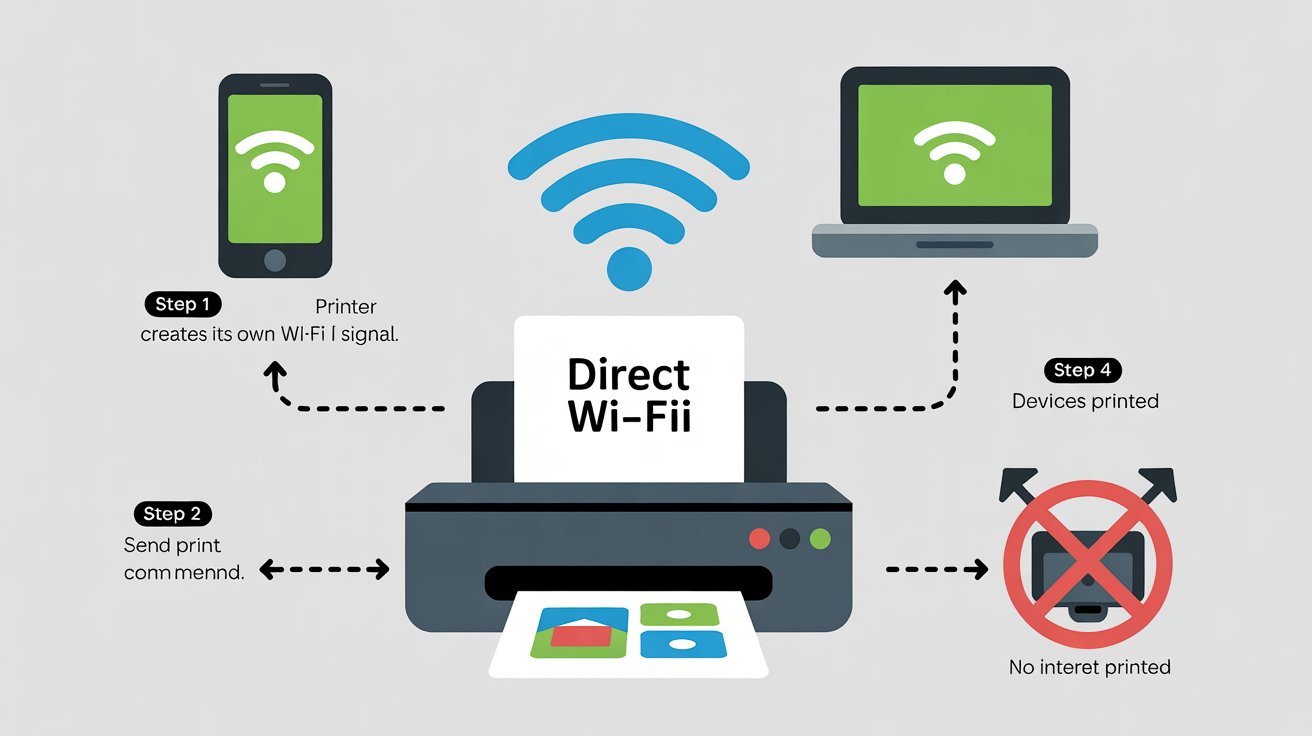
WiFi Direct printing is a technology that allows your printer to create its own wireless network. Instead of connecting to a router or shared Wi-Fi, your smartphone, tablet, or laptop connects directly to the printer.
👉 In simple terms: It’s like connecting your phone to Bluetooth speakers—but instead, you’re connecting to a printer.
🔄 How Does WiFi Direct Printing Differ from Standard Wi-Fi Printing?
Many people mix up WiFi Direct with normal wireless printing. Here’s how they differ:
- Wi-Fi Printing (Traditional):
- Your printer and device connect through a Wi-Fi router.
- Requires an internet connection.
- Supports multiple devices on the same network.
- WiFi Direct Printing:
- No router required.
- Printer itself creates a Wi-Fi hotspot.
- Works offline (peer-to-peer connection).
💡 Think of WiFi Direct as a shortcut—no middleman (router) needed.
🖨️ Step-by-Step: How Does WiFi Direct Printing Work?
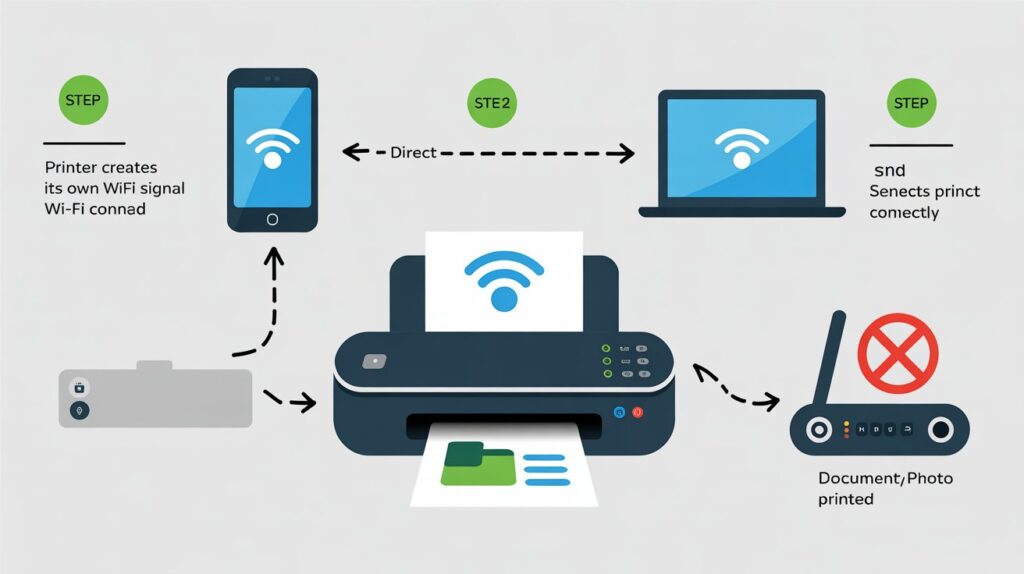
Let’s break it down into a simple 4-step process:
1. Printer Creates Its Own Wi-Fi Network
- Your WiFi Direct-enabled printer generates a private wireless signal.
- This signal is unique, like a mini hotspot.
2. Device Connects to the Printer
- On your phone, tablet, or laptop, go to Wi-Fi settings.
- You’ll see the printer listed as a network.
- Connect by entering the WPA2 password (usually printed on the printer’s display or manual).
3. Peer-to-Peer Connection is Established
- The printer and your device now communicate directly.
- No internet, no router—just a secure wireless link.
4. Send the Print Command
- Open your document or photo.
- Choose Print > Select Printer > [Your Printer’s WiFi Direct Name].
- Your file is sent directly to the printer for output.
📌 Example: If you’re at a café with no Wi-Fi, you can still print by connecting your phone directly to the printer’s Wi-Fi signal.
🌟 Benefits of WiFi Direct Printing
Here’s why you’ll love WiFi Direct:
- 🚀 Easy Setup – No router or complicated installation.
- 📱 Mobile-Friendly – Print directly from smartphones and tablets.
- 🔌 No Internet Required – Works even in offline environments.
- 🏠 Great for Home & Small Office – No need to configure large networks.
- 🎒 Portability – Perfect for on-the-go printing.
⚠️ Limitations of WiFi Direct Printing
While it’s super handy, there are a few downsides:
- 📏 Short Range – Works only within 30–60 feet.
- 🔒 Security Risks – If not password-protected, others can connect.
- 💻 Compatibility Issues – Not all devices and printers support WiFi Direct.
- 🌐 Limited Multi-Device Use – Works best for one-to-one connections.
📌 Common Uses of WiFi Direct Printing
You’ll find WiFi Direct printing helpful in many scenarios:
- 🏡 Home Printing – Quick and easy printing from laptops or phones.
- 🏢 Small Offices – Eliminates the need for IT setup.
- ✈️ Travel/Events – Portable printers for instant prints.
- 🎓 Classrooms – Teachers can print without relying on school networks.
🔍 Related Features You Should Know
- AirPrint (Apple): Lets you print wirelessly from iPhone/iPad without extra apps.
- HP ePrint: Email documents to your printer’s unique address.
- Google Cloud Print (discontinued): Allowed online printing via Google accounts.
- Wi-Fi Printing: Standard method using routers and internet connectivity.
📊 Summary Table
| Feature | Wi-Fi Printing (Traditional) | WiFi Direct Printing |
|---|---|---|
| Requires Router? | ✅ Yes | ❌ No |
| Works Offline? | ❌ No | ✅ Yes |
| Device Connection | Through shared network | Direct peer-to-peer |
| Best For | Large networks, offices | Homes, small offices, mobile use |
🙋 FAQs About How Does WiFi Direct Printing Work
1. How does WiFi Direct work on HP printers?
HP printers with WiFi Direct let you connect your phone or laptop directly by selecting the printer’s network name in Wi-Fi settings, then printing without a router.
2. How does WiFi printing work compared to WiFi Direct?
WiFi printing uses a router and internet, while WiFi Direct connects your device straight to the printer without a router.
3. How does a wireless printer work with WiFi Direct?
A wireless printer works like a mini hotspot, allowing direct peer-to-peer communication with your device.
4. Is WiFi Direct secure?
Yes—most printers require a WPA2 password. However, always keep your password safe to prevent unauthorized access.
5. Can multiple devices use WiFi Direct at the same time?
Some printers support it, but it’s best for one-to-one connections. For multiple users, traditional Wi-Fi printing is more reliable.
📢 Final Thoughts
Now you understand how does WiFi Direct printing work—it’s basically a direct wireless connection between your device and printer without needing a router. It’s perfect for quick, portable, and offline printing, though it does come with some limitations in range and compatibility.
👉 If you print often from mobile devices, WiFi Direct can make your life easier. Next time you see your printer’s “WiFi Direct” option, try it out—you’ll be amazed at how simple it is!